
QuickBooks Error 185 occurs if your bank is required to authenticate your identity before QuickBooks Online can access your bank account. The bank will ask you some security questions or send you an OTP through SMS to your mobile device. It helps in securing your financial details. You can solve the problem with the help of answering the questions, entering the code, or reconnecting your bank account. Just follow the process mentioned below to make things right.
What Does QuickBooks Error 185 Mean?
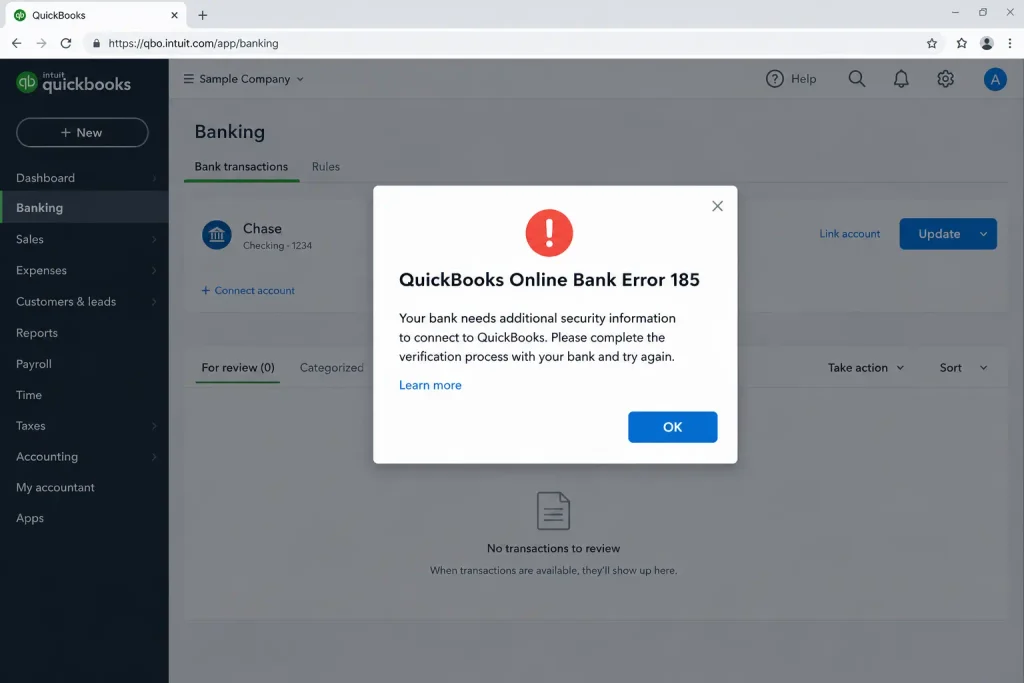
This error means your bank needs more details to confirm that you are the account owner.
- Your bank asks for extra details before connecting
- QuickBooks Online may ask you to answer security questions
- Your bank may send a code to your phone
- Bank updates may stop until you finish the check
What Causes QuickBooks Error 185?
Your bank or browser may need a few changes before QuickBooks can update your account.
- Your bank needs to check your identity
- Your bank asks for a security code
- Your bank asks questions about your account
- Your bank login details have changed
- Your browser blocks a security window
- The person who first connected the account must approve it
- Your bank’s website is not working
- Your internet connection is weak
What Are the Signs of QuickBooks Error 185?
You may notice these signs when QuickBooks cannot finish checking your bank account.
- QuickBooks shows an error during a bank update
- Your bank keeps asking security questions
- You receive a code to confirm your identity
- New bank transactions do not appear
- QuickBooks asks you to sign in again
- A security question does not appear on the screen
What Should You Check Before Fixing QuickBooks Error 185?
Get these details ready before you start fixing the bank connection.
- Keep your bank username and password ready
- Keep your phone nearby for the security code
- Make sure you can sign in to your bank’s website
- Check your email for a message from QuickBooks
- Check that your internet is working
- Allow pop-ups in your browser
- Update your browser if needed
- Check whether your bank’s website is working
- Make sure you can access the account in QuickBooks
How to Fix QuickBooks Error 185 by Connecting Your Bank Again
Connect your bank account again when QuickBooks asks you to approve the connection.
- Open QuickBooks Online
- Find the bank error message
- Select Send a request if you see this option
- Ask the person who first connected the account to check their email
- Open the email from QuickBooks
- Select the link in the email
- Sign in to QuickBooks Online
- Follow the steps to confirm your identity
- Return to the bank page and check the connection
Read More:- QuickBook bank feed errors
How to Fix QuickBooks Error 185 by Checking Your Bank Account
Sign in to your bank’s website to finish any checks before updating QuickBooks.
- Open your bank’s official website
- Sign in with your current login details
- Answer any security questions
- Enter a code if your bank asks for one
- Return to QuickBooks Online
- Open Transactions and select Bank transactions
- Choose the bank account with the error
- Select Update
- Follow any new instructions on the screen
How to Fix QuickBooks Error 185 by Answering Security Questions
Answer each question from your bank to prove that you own the account.
- Open the bank account in QuickBooks Online
- Start a bank update
- Wait for the security question
- Enter the correct answer
- Submit your answer
- Answer any other questions that appear
- Update the bank account again
How to Fix QuickBooks Error 185 by Entering a Code
Use the latest code from your bank whenever QuickBooks asks you to confirm your identity.
- Start a bank update in QuickBooks Online
- Check your text messages or bank security app
- Look for a code from your bank
- Enter the code on the screen
- Submit the code before it expires
- Enter another code if your bank asks for one
- Check whether the bank account updates
How to Fix QuickBooks Error 185 by Changing Browser Settings
Change your browser settings if the bank’s security question does not appear.
- Check whether your browser blocks pop-ups
- Allow pop-ups for QuickBooks Online
- Reload the QuickBooks page
- Start the bank update again
- Answer any security questions that appear
- Try a private or incognito browser window
- Open QuickBooks in another supported browser if needed
- Update the bank account again
How to Fix QuickBooks Error 185 by Checking Your Internet
Check your internet and bank website if the error continues after you verify your identity.
- Open your bank’s website
- Check whether you can sign in
- Look for a message about bank service problems
- Open another website to test your internet
- Restart your router if the internet is not working well
- Wait if your bank’s website is down
- Try updating the bank account again
How to Check Whether QuickBooks Online Bank Error 185 Is Fixed
Check these points to make sure your bank account is working again.
- The bank account connects without showing the error
- The bank update finishes
- New transactions appear in QuickBooks Online
- The latest transaction date changes after an update
- QuickBooks no longer asks for the same verification
Check the downloaded transactions to make sure they are correct and not repeated.
What Tips Can Help Prevent Banking Errors?
Follow these simple steps to help your bank account stay connected.
Tips to Prevent Errors
- Keep your bank login details up to date
- Answer security questions when your bank asks
- Use the latest code sent by your bank
- Allow pop-ups in your browser
- Use an updated browser
- Check messages from your bank
- Make sure your internet works well
- Keep access to the email used to connect the bank
- Finish security checks before updating transactions
Your bank may still ask you to confirm your identity from time to time.
What Should You Avoid When Fixing Banking Errors?
Avoid these actions while trying to reconnect your bank account.
- Entering the wrong security answer again and again
- Using an old or expired code
- Sharing your bank password or security code
- Ignoring a warning from your bank
- Deleting important files to fix a bank connection
- Reinstalling QuickBooks before checking the bank login
- Using repair tools before trying the bank’s security steps
- Refreshing the account again and again without finishing verification
Read More:- Fix QuickBooks Installation Errors
Conclusion
QuickBooks Error 185 appears when your bank needs to check your identity. You can fix it by answering security questions, entering a code, or connecting your bank account again. If the security screen does not appear, check your browser settings. If the error stays, contact Accounting Assist Pro support for help.
Frequently Asked Questions
1. What does QuickBooks Error 185 mean?
QuickBooks Error 185 means your bank needs to check your identity before sharing transactions with QuickBooks Online. It may ask security questions or send a code.
2. Why does Error 185 QuickBooks Online appear?
Error 185 QuickBooks Online appears when your bank needs more details to confirm your identity. Answer the questions or enter the code to continue.
3. How to fix Error 185 in QuickBooks Online?
To fix How to Fix Error 185 in QuickBooks Online, answer your bank’s security questions, enter the latest code, or connect your bank account again.
4. Why does QuickBooks Online Error 185 keep appearing?
QuickBooks Online Error 185 may keep appearing when your bank asks for another security check. Finish each check and try updating the account again.
5. What if the bank’s security question does not appear?
Allow pop-ups in your browser and reload QuickBooks Online. If the question still does not appear, try another supported browser.
6. Can browser problems cause QuickBooks bank errors?
Yes, browser settings may stop a security window from opening. Allow pop-ups, reload the page, and try connecting your bank again.
7. What if another person connected my bank account?
Ask the person who first connected the account to check their email. They may need to approve the request and complete the security check.
8. Can QuickBooks Tool Hub fix this bank error?
QuickBooks Tool Hub is not the first tool to try for this error. Start by checking your bank login, security questions, and code.
9. Will QuickBooks download transactions after I fix the error?
Yes, QuickBooks can download transactions after your bank connection works again. Check the new entries to make sure they are correct.
10. Can QuickBooks Error 185 stop bank transactions from updating?
Yes, QuickBooks Error 185 can stop new bank transactions from appearing. Complete your bank’s security check, then update the account again.
11. Is QuickBooks Error 185 related to my bank password?
Sometimes, your bank may need you to sign in again. Check your login details and follow any extra security steps shown on the screen.
12. What should I do if my bank rejects the security code?
Ask your bank for a new code and enter it before it expires. Check that you are using the code sent to your registered phone.
13. QuickBooks Bank Account Error 185: Causes & Fixes
QuickBooks Bank Account Error 185 occurs when extra bank verification is required. Learn how to fix OTP, security questions, and MFA issues quickly.