
QuickBooks Error 1618 can show up while another app is being set up or updated on your PC. When that happens, QuickBooks Desktop may fail to install, not finish the update, or not open as expected. Sometimes the message appears because Windows Installer is already working on something else. First, check whether any installs are still running, next restart your computer and try again at last, run the QuickBooks Install Diagnostic Tool.
What Is Error 1618?
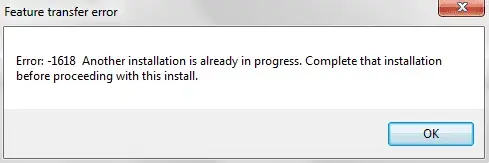
This error is an installation issue that stops QuickBooks Desktop from being installed or upgraded. This error usually involves Windows Installer activity rather than your company file. Windows stops some installation tasks from running at the same time. That’s why another installer can block QuickBooks from completing its task.
Common situations include:
Another installation is running
- Windows Update may still be installing components
- Another software setup may remain active
- A previous installation may not have finished properly
Windows Installer remains active
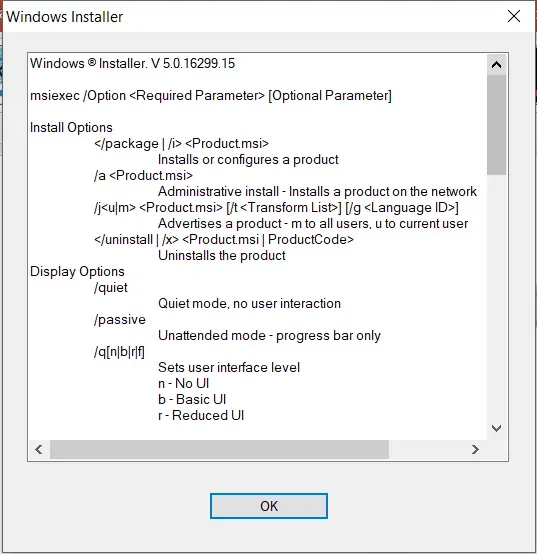
- MSIEXEC.EXE may still run in the background
- A previous setup process may remain stuck
- QuickBooks may detect an existing installer session
QuickBooks components need repair
- Runtime libraries may require reinstallation
- QuickBooks program components may need repair
- Installation files may require refreshing
How to Identify Error 1618
You can identify QuickBooks Error code 1618 when installation or updating stops unexpectedly. Windows may show an installation-related message during the process.
Look for these common signs:
- Installation stops before QuickBooks finishes
- Microsoft Runtime Library installation displays error 1618
- Windows reports another installation is already running
- QuickBooks cannot complete an update
- The setup process repeatedly fails after restarting
The exact Windows meaning is straightforward: another installation must finish before the current setup can continue.
What Should You Do Before Fixing QuickBooks Error 1618?
Prepare your computer before changing installation settings. These simple steps reduce interruptions and protect your QuickBooks data.
Complete these checks first
- Save your work in every open application
- Close QuickBooks Desktop completely
- Finish any visible Windows installation
- Start the computer one more time before trying again
How to Fix QuickBooks Error 1618
The following methods focus on the main Windows Installer and QuickBooks components involved with this issue. Start with the simplest method and continue only when necessary.
1. Check for Another Installation
- Open Task Manager using Ctrl + Shift + Esc
- Check for active installation processes
- Allow another setup to finish
- Restart Windows before reopening QuickBooks
2. Run the QuickBooks Install Diagnostic Tool
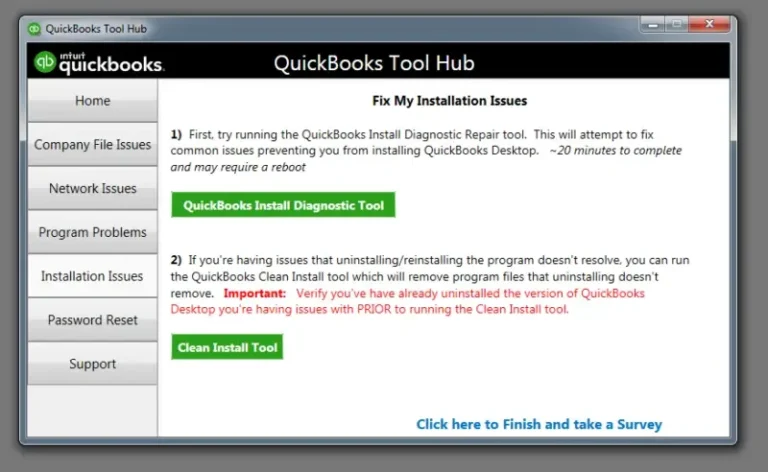
- Close QuickBooks Desktop
- Open the QuickBooks Tools Hub
- Select Installation Issues
- Run QuickBooks Install Diagnostic Tool
- Restart the computer after completion
Read More: Intuit QuickBooks Tool Hub
3. Check MSIEXEC.EXE Processes
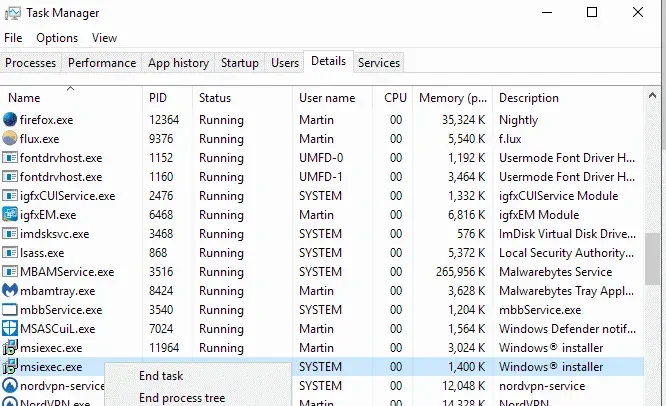
- Open Task Manager
- Search for MSIEXEC.EXE
- Check whether an installation is still active
- Avoid ending a process that belongs to an active installation
- Restart Windows after the installation finishes
4. Reinstall Microsoft Visual C++ Components
- Obtain the supported Microsoft Visual C++ Redistributable package
- Install the required package for your Windows system
- Restart the computer
- Try installing or updating QuickBooks again
5. Run Quick Fix My Program
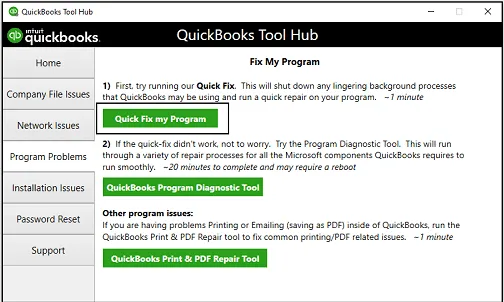
- Open QuickBooks Tools Hub
- Select Program Problems
- Choose Quick Fix My Program
- Reopen QuickBooks after the repair
6. Reinstall QuickBooks Desktop
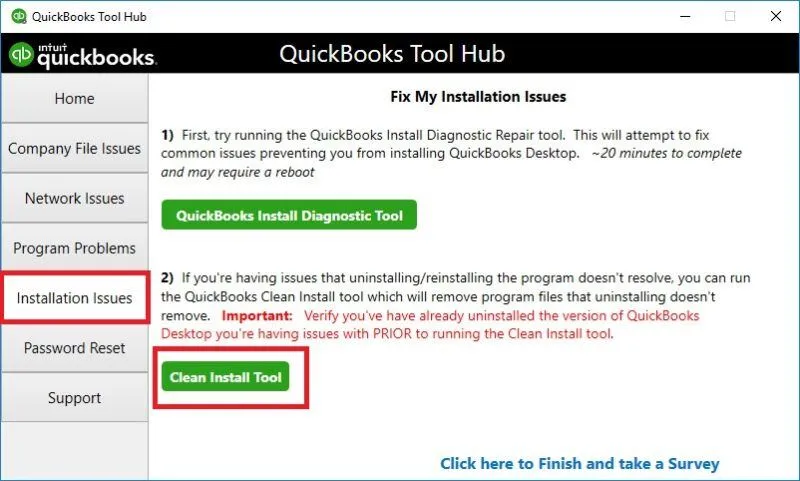
- Back up your company file
- Uninstall QuickBooks Desktop
- Use the QuickBooks Clean Install Tool when necessary
- Reinstall QuickBooks from a trusted source
How to Prevent QuickBooks Update Error 1618
Preventing installation conflicts helps QuickBooks complete updates without interruptions. Avoid starting multiple software installations simultaneously. Allow Windows updates to finish before updating QuickBooks Desktop:
- Close unnecessary setup programs before updating
- Check Task Manager for active installation processes
- Finish Windows updates before opening QuickBooks
- Restart Windows after major software installations
- Keep QuickBooks Desktop updated
- Download QuickBooks components from trusted sources
If many QuickBooks Desktop versions of the same year are installed, update conflicts can also occur. Intuit recommends using manual updates in certain multiple-installation situations.
Conclusion
QuickBooks Error 1618 prevents QuickBooks Desktop from installing or updating when Windows detects another active installation. Start by finishing other setup tasks and restarting your computer. Next, use QuickBooks Tools Hub and check MSIEXEC.EXE processes. Repair Microsoft Visual C++ components if the problem remains. Reinstall QuickBooks only after simpler methods fail. These steps provide a practical path for resolving installation conflicts without making risky system changes., you can also visit AccountingAssistPro.
Frequently Asked Questions
1. What causes QuickBooks Error 1618?
QuickBooks Error 1618 occurs when Windows detects another installation already running. A stuck installer can also prevent QuickBooks from starting another setup process.
2. How do I fix QuickBooks Error 1618?
Start by completing other installations and restarting Windows. Then use QuickBooks Tools Hub, check MSIEXEC.EXE, and repair Microsoft Visual C++ components.
3. What does Error 1618 mean in QuickBooks?
QB Error code 1618 means another installation is already in progress. Windows Installer prevents the new installation from proceeding until the existing process finishes.
4. Why does QuickBooks say another installation is running?
Windows may still have an active installation process in the background. MSIEXEC.EXE can also remain active after another setup attempt.
5. How do I check MSIEXEC.EXE?
Open Task Manager and review the running processes. Look for MSIEXEC.EXE and determine whether another installation is currently active.
6. Can restarting Windows fix Error 1618?
Yes, restarting Windows can clear an installation process that has stopped responding. Try this before performing more advanced troubleshooting.
7. Can QuickBooks Tools Hub fix Error 1618?
Yes. Intuit recommends the QuickBooks Tools Hub and Install Diagnostic Tool for QuickBooks installation problems.
8. Does Error 1618 damage my QuickBooks company file?
No. Error 1618 QuickBooks usually concerns the installation process. However, create a company file backup before performing major repairs.

1 Comment