I’ve opened more QuickBooks files during tax season than I can accurately count at this point, and almost every time a client tells me their taxes are a mess because of QuickBooks, the software itself turns out not to be the problem. Something upstream broke first. A bank feed rule miscategorized six months of expenses. A sales tax setting sat untouched after a state changed its rate. A 1099 got filed with an EIN that had one digit off. QuickBooks tax filing problems almost always start as small data problems that nobody caught before the return was due, and by the time they surface, they look a lot bigger than they actually are.
A client of mine, a home renovation contractor with two employees, called me in February convinced his QuickBooks file was corrupted because his Schedule C numbers looked nothing like what he remembered spending. Nothing was corrupted. A bank rule set up three years earlier was still sorting every Home Depot purchase as office supplies, including the lumber and drywall that should have been cost of goods sold. Once we found it, the fix took ten minutes. Finding it took an hour, because nobody had looked at that rule since the day it was created.
If you’re staring at numbers that don’t match what your accountant expected, or an e-file rejection you don’t understand, this is the rundown I’d give that same client sitting across from me. What usually causes it, what you can check yourself in under half an hour, and where you actually need someone who does this for a living.
What actually causes tax filing problems in QuickBooks
After a few years of cleaning up other people’s books, these are the causes that show up over and over.
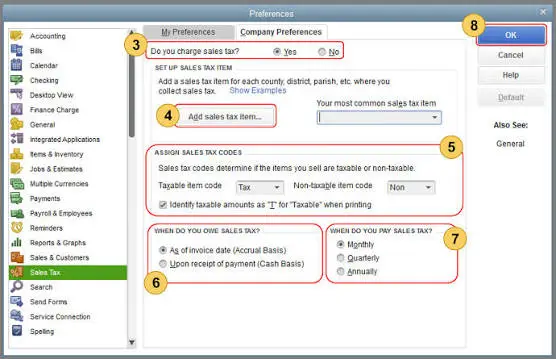
Sales tax settings that were never reviewed after setup. QuickBooks Online’s Automated Sales Tax feature calculates what you owe based on the shipping address on each invoice and the tax rates it has loaded for that address. That works fine until a state changes its rate, or you start selling into a new state, and nobody goes back to check the settings. The liability report keeps generating numbers, they just quietly drift away from what you actually owe.
Bank feed rules that miscategorize transactions. A rule built two years ago to sort a vendor as office supplies keeps running even after your spending with that vendor changes. Nobody notices until tax season, when the Schedule C categories look wrong and someone has to figure out why.
1099 vendor information that’s flat out incorrect. Wrong EIN, wrong legal name, a sole proprietor listed under a business name instead of their own. The IRS checks this against its own records during e-file, and a mismatch means a rejected filing, not a warning you can ignore.
Payroll tax forms QuickBooks doesn’t file on your behalf. Full Payroll Service handles federal filings and most state filings automatically, but not every state and not every plan tier. If you’re on a lower tier or in a state QuickBooks doesn’t cover, you might assume a filing happened when it didn’t.
Books that were never actually closed. Without a closing date and password, anyone with access can edit a transaction from March after your accountant has already pulled the year end numbers, and you won’t know it happened until the totals stop matching.
A Desktop to Online migration that didn’t map correctly. Opening balances, retained earnings, and loan balances sometimes land in the wrong accounts during conversion, and the error doesn’t surface until someone runs a report for tax purposes.
Reconciliation gaps. If even one bank or credit card account was never reconciled for the year, the numbers feeding your tax prep are unreliable no matter how clean everything else looks.
Cash vs accrual confusion. QuickBooks defaults some reports to accrual, but plenty of small businesses file on a cash basis. Handing your preparer the wrong version of a report causes real discrepancies that have nothing to do with your actual income.
Multiple businesses or personal expenses running through one file. This comes up more than you’d think with sole proprietors and single member LLCs. A rental property, a side business, and personal spending all sitting in one QuickBooks file makes it almost impossible to pull clean numbers for any one of them at tax time.
Estimated tax payments that never got recorded in QuickBooks at all. A lot of business owners pay quarterly estimates straight from a personal or business account through the IRS website and never log the payment anywhere in their books. Come tax time, the accountant has no record of what was already paid, and either has to track down four separate bank statements or take the owner’s word for it, which is exactly the kind of thing that leads to a return getting filed with the wrong total already paid in.
What to check before you assume something is broken
Most of this you can diagnose yourself in under half an hour.
Pull your Profit and Loss for the full year on both cash and accrual basis and put them side by side. If your preparer expected cash basis and you handed over accrual numbers, that gap alone accounts for a lot of confusion.
Check the reconciliation status on every account, not just your main checking account. Open the reconciliation history and confirm every month through December shows reconciled with a difference of zero.
Run the sales tax liability report and compare it against what you actually paid to the state. If the two numbers don’t match, something in the setup needs attention before you file, not after.
Open the Uncategorized Income and Uncategorized Expense accounts on your P&L. Anything sitting in those buckets needs to be reclassified before the numbers mean anything.
Check the Contractors tab and confirm every 1099 vendor has a completed W-9 on file with the correct legal name and TIN. This is the single most common reason a 1099 e-file gets rejected.
Look at your payroll tax center for any state filings marked as your responsibility rather than QuickBooks’s. It’s easy to miss this distinction, and it’s usually written in small text on the payroll dashboard rather than flagged anywhere obvious.
If you run more than one business or have personal transactions mixed into the same account, separate them before tax prep starts, not during. A quick tag or class won’t fix a file where personal and business spending share the same bank feed.
Once your prior year is finalized, set a closing date with a password. It won’t undo what already happened, but it stops the same mistake from repeating next year.
The problems that need more than a quick look
A few of these are simple enough to fix in an afternoon. A few aren’t, and they’re worth understanding properly instead of guessing your way through them.
Sales tax drift is the one I run into most. Automated Sales Tax pulls rates from a database QuickBooks maintains and applies them based on the address on each invoice, which sounds fine until you remember that rates change mid year, exemption certificates have to be applied manually, and marketplace facilitator laws mean some of your sales might already have tax collected and remitted by Amazon or Shopify before it ever touches your books. When that happens, QuickBooks has no way of knowing the tax was handled elsewhere, so it counts it again in your liability report. There isn’t one setting that fixes this. You go through the liability report period by period, compare it against your actual filings and payments, and record adjustments for anything counted twice or missed entirely. For a business selling in more than two or three states, I’d rather review this quarterly than deal with a full year of drift at once.
1099 e-file rejections come down to a handful of IRS validation checks, and QuickBooks will tell you which one failed if you know where to look for it. The most common is a TIN and legal name mismatch, where the name on the 1099 doesn’t match what the IRS has on file for that EIN or SSN. This happens constantly with single member LLCs, because the IRS wants the owner’s name, not the LLC name, unless the LLC elected corporate tax treatment. The next most common is a duplicate filing, where a 1099 gets submitted twice because someone resubmitted after a correction without voiding the original first. If your e-file bounces back, read the actual rejection code QuickBooks shows you before resending anything. Resending a form with the same error just gets you the same rejection a second time.
Payroll tax filing gaps are less about QuickBooks making a mistake and more about a plan or setup gap nobody explained clearly. Full Service Payroll covers federal 941 and 940 filings plus state withholding and unemployment in most states, but a handful of states have requirements QuickBooks doesn’t fully automate, including certain local taxes and specific new hire reporting formats. If you’re on Core or Premium payroll rather than the full service tier, you may be responsible for filing some of these yourself even though QuickBooks calculates the amounts automatically. I’ve seen more than one business owner assume everything was filed because money came out of the account on schedule, when what actually happened was the liability got calculated and set aside, not paid to the state. Those are two different things in QuickBooks, and the payroll tax center shows both, but you have to know to look.
Fixed assets and depreciation cause a quieter version of the same problem. QuickBooks Online doesn’t have a real depreciation schedule built in, so most bookkeepers either track it in a spreadsheet or rely on the tax preparer’s software to calculate it separately. If those two sets of numbers were never reconciled, the balance sheet in QuickBooks and the depreciation schedule the accountant is actually using for the return can drift apart within a year or two, especially after an asset gets sold or written off and the entry in QuickBooks doesn’t get updated to match.
Multi-state nexus is the one nobody thinks about until it’s already a problem. If you sell enough into a state, or store inventory there, or have an employee working remotely from there, you may owe tax in that state whether or not you ever registered to collect it. QuickBooks won’t warn you about this on its own. It only calculates tax for states you’ve told it to track, so a business that crosses an economic nexus threshold in a new state usually doesn’t find out from the software. It finds out from a notice, or from an accountant who happens to ask the right question during tax prep. Checking your total sales by state once or twice a year, even with a simple report, catches this before it becomes a filing problem instead of after.
One more that catches people off guard: if your accountant imports numbers straight from QuickBooks into their tax software without reviewing the trial balance first, any error sitting in the books gets baked into the return without anyone catching it. A preparer who never asks you a single question about your books before filing is either very confident your file is clean, or not looking closely enough.
A quick example of how small this usually starts
Most of what I’ve described sounds abstract until you see it play out on one file. A client running a small online store had been collecting sales tax correctly for two years, but her liability report showed nearly four thousand dollars more owed than she’d actually paid. Nothing was stolen and nothing was miscalculated in the way she assumed. Her sales platform had started collecting and remitting tax directly in six states under marketplace facilitator rules, but QuickBooks had no way of knowing that, so it kept adding those sales to her own liability calculation as if she still owed the tax herself. Once we identified which states were affected and recorded adjusting entries to remove that double counted liability, the report matched her actual filings again.
Accounting Assist Pro can also help businesses review QuickBooks tax-related discrepancies and identify issues that may affect their records. The fix was a few journal entries. Finding the cause took longer than fixing it, which is true of almost everything on this list.
Frequently asked questions
Why don’t my QuickBooks numbers match what my accountant filed?
Usually a basis mismatch between cash and accrual, uncategorized transactions that got cleaned up during tax prep without being updated in QuickBooks, or a reconciliation gap somewhere in the year. Ask your accountant for the adjusting entries they made and enter them back into QuickBooks so both sets of books agree going forward.
Can QuickBooks file my 1099s for me automatically?
Yes, through the 1099 e-file service, but only if the vendor information is complete and accurate. QuickBooks checks each TIN against the vendor name before submitting, and a mismatch causes a rejection rather than a silent failure.
Does QuickBooks Payroll file my state taxes automatically?
It depends on your plan and your state. Full Service Payroll covers federal filings and most state filings, but some states and local taxes fall outside what QuickBooks automates. Check the payroll tax center under your account to see which filings are marked as QuickBooks’s responsibility versus yours.
What happens if I already filed my taxes with wrong QuickBooks numbers?
You may need an amended return, depending on how significant the difference turns out to be. Fix the books first, work out the actual impact on income or expenses, then talk to your preparer about whether an amendment is worth filing.
Why doesn’t my sales tax liability report match what I actually paid the state?
This is almost always Automated Sales Tax counting something twice, missing an exemption, or not accounting for tax a marketplace already collected on your behalf. Run the liability report against your actual filed returns period by period to find where the two diverge.
Can I fix last year’s books after taxes are already filed?
Yes, but be careful about changing anything in a closed period without talking to your accountant first, since it may trigger the need for an amended return. If you do need to fix something in a prior period, set a closing date password afterward so the same change doesn’t happen again unnoticed.
Why did my 1099 e-file get rejected?
The most common reason is a TIN and legal name mismatch, especially for single member LLCs where the IRS expects the owner’s personal name rather than the business name. Check the exact rejection code QuickBooks provides rather than guessing, since a second attempt with the same error will bounce again.
None of this is complicated once you know where to look, but it does take time, and tax season is rarely when a business owner has a spare afternoon to reconcile eleven months of bank feeds. If your QuickBooks file needs a real cleanup before your next filing deadline, that kind of work is exactly what Accounting Assist Pro’s bookkeeping services handle every month, not just in March. It’s a lot easier to catch a sales tax problem in October than to explain it to the IRS in April