Paying firms have to file qualifying payments to the IRS. How to generate 1099 for contractors begin with gathering Form W-9 filled out by the contractor and examining payment records. In 2026, the general threshold for filing Form 1099-NEC is $2,000. The IRS requires the form 1099-NEC for qualifying payments for nonemployee compensation.
What Is Form 1099-NEC for Contractors?
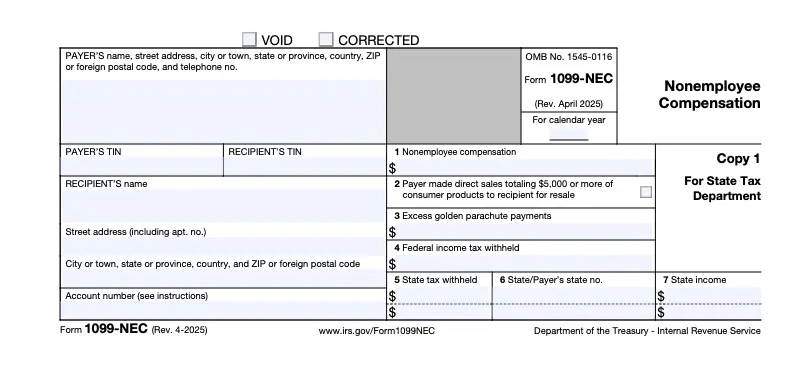
Form 1099-NEC records payments made to nonemployees for business services. Ways to create 1099 for contractor depends on recognizing the contractor and qualifying payments.
Key Points
- Report qualifying nonemployee compensation for business services
- Use Form W-2 for employee wages instead
- Apply the $2,000 threshold to payments made during 2026
- Review payment type before deciding which information return applies
- Check current IRS instructions for exceptions and special situations
Who Needs to Receive a 1099-NEC?
Independent contractors who provide services for a business may receive Form 1099-NEC when payments meet the applicable reporting threshold. Sole proprietors and many single-member LLCs can fall within these reporting rules. Businesses should determine the worker’s status before preparing any form. The IRS also provides specific exceptions for certain payments and recipient types.
Common Recipients
- Independent contractors
- Freelancers providing business services
- Sole proprietors
- Certain partnerships
- Some single-member LLCs
- Other nonemployees meeting applicable reporting requirements
Payments Usually Outside Form 1099-NEC
- Employee wages reported on Form W-2
- Payments that do not meet the applicable reporting threshold
- Payments covered by specific IRS exceptions
- Certain payments made through arrangements with separate reporting rules
Information You Need Before Creating a 1099
Accurate information makes how to generate 1099 for contractors much easier. Start with the contractor’s completed Form W-9 and compare it against your accounting records. The W-9 provides the payee’s name and taxpayer identification number. The IRS recommends keeping W-9 forms in your records for four years.
Required Information
- Contractor’s legal name
- Business name, when applicable
- Mailing address
- Taxpayer Identification Number
- Total qualifying payments
- Completed Form W-9
- Business payment records
- Payer name and taxpayer information
How to Generate 1099 for Contractors
The process involves six main steps. Businesses should collect tax information, review payments, identify reportable amounts, prepare Form 1099-NEC, submit it, and provide the contractor’s copy. The IRS generally requires Form 1099-NEC to reach both the IRS and recipient by January 31.
1. Collect a Completed W-9
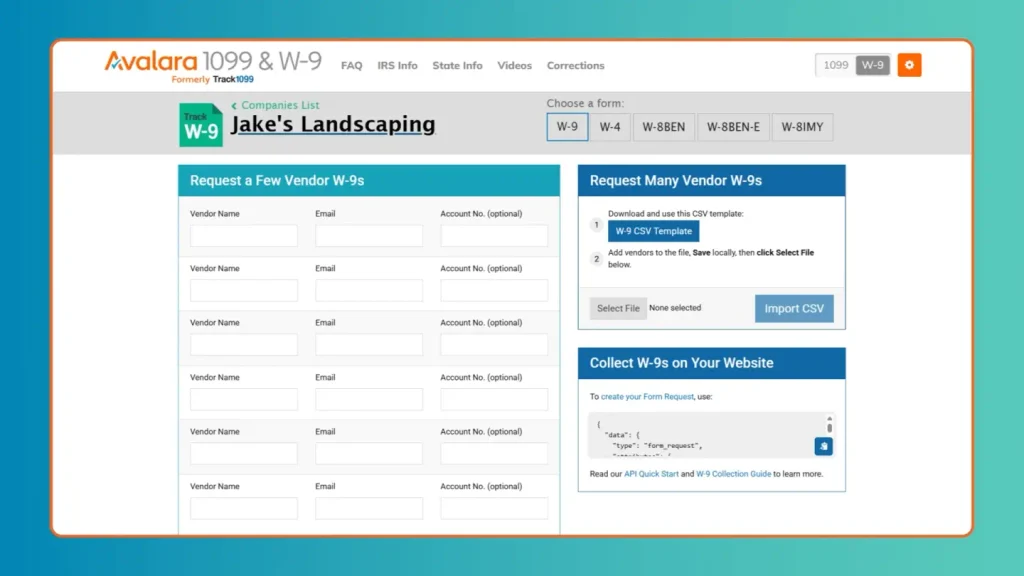
- Request Form W-9 from every applicable contractor
- Verify the contractor’s legal name against business records
- Check the taxpayer identification number for accuracy
- Store the completed form securely with tax records
2. Review Contractor Payments
- Check invoices, checks, cards, and electronic payments
- Separate payments connected with business services
- Calculate the contractor’s total qualifying payments
- Compare totals against your accounting records
3. Determine Which Payments Are Reportable
- Review the purpose of every contractor payment
- Apply the reporting threshold for the payment year
- Exclude payments covered by specific exceptions
- Check current IRS guidance before submitting forms
4. Complete Form 1099-NEC
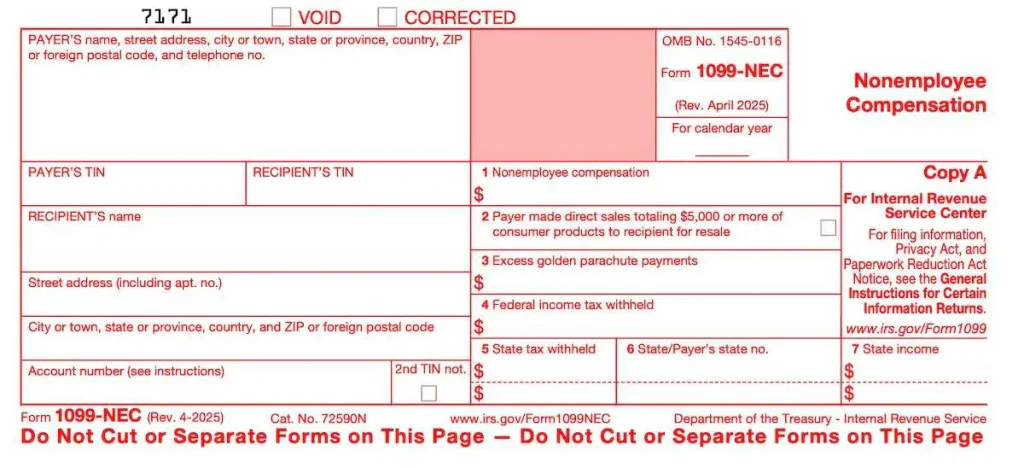
- Enter the payer’s business information
- Enter the contractor’s legal information
- Enter the taxpayer identification number
- Report qualifying nonemployee compensation
- Review every field before submission
5. Submit the 1099 to the IRS
- Choose an IRS-approved filing method
- Submit Form 1099-NEC by the applicable deadline
- Follow electronic filing requirements when applicable
- Save confirmation showing successful submission
6. Provide a Copy to the Contractor
- Provide the required contractor copy
- Use an acceptable delivery method
- Confirm the recipient receives the form
- Keep delivery records when appropriate
How to Create a 1099 for a Contractor in QuickBooks
Businesses using QuickBooks can organize contractor information and payment records before filing. To create a 1099 for a contractor, review contractor profiles and confirm their tax details first. Then check the payment report for the relevant tax year. QuickBooks can help organize information, but businesses remain responsible for reviewing the final filing.
QuickBooks Review Steps
- Review contractor profiles
- Confirm W-9 information
- Check taxpayer identification details
- Review contractor payments
- Run the appropriate 1099 report
- Compare totals with source records
- Correct missing information
- Review the final form before filing
Common Mistakes to Avoid When Creating a Contractor 1099
Small data errors can create filing problems or require corrections later. A careful review helps businesses create a 1099 for contractor payments with fewer mistakes.
Mistakes to Watch
- Using an incorrect contractor name
- Entering the wrong taxpayer identification number
- Reporting an incorrect payment total
- Missing an eligible contractor
- Misclassifying an employee as an independent contractor
- Waiting until the deadline to review records
- Filing incomplete information
- Failing to retain supporting documents
What Happens If You File an Incorrect 1099?
An incorrect Form 1099-NEC should be addressed promptly. First, identify the incorrect information and compare it with your source records. Then follow the IRS correction procedure that applies to the error. Keep documentation showing what changed and why. Correcting errors quickly helps keep payer and recipient records consistent.
Correction Steps
- Identify the incorrect field
- Review the original W-9
- Compare the reported amount with payment records
- Determine the appropriate correction procedure
- Submit the corrected information when required
- Provide the recipient with the corrected form
- Keep documentation supporting the correction
1099-NEC Contractor Filing Checklist

Use this checklist before you create 1099 for contractor payments and submit the forms.
- Collect completed W-9 forms
- Verify contractor names
- Confirm taxpayer identification numbers
- Review annual payment totals
- Identify qualifying payments
- Check the applicable reporting threshold
- Complete Form 1099-NEC
- Review every field
- Submit the required form
- Provide the contractor’s copy
- Save filing confirmation
- Retain supporting records
Conclusion
Knowing how to generate 1099 for contractors helps businesses meet reporting duties and maintain accurate tax records. Start with complete W-9 information and verify every qualifying payment before filing. Businesses managing many contractors can also use AccountingAssistPro for professional accounting support to review records, prepare forms, and reduce filing errors.
Frequently Asked Questions
1. How do you generate 1099 for contractors?
Collect Form W-9, review qualifying payments, complete Form 1099-NEC, submit it to the IRS, and provide the required contractor copy.
2. What is the 1099-NEC threshold for contractors in 2026?
For payments made in 2026, businesses generally must report $2,000 or more paid for qualifying nonemployee services.
3. Can I create a 1099 for a contractor using QuickBooks?
Yes. QuickBooks can organize contractor information and payments, generate applicable reports, and support the preparation process before filing.
4. What form do I use for independent contractors?
Businesses generally use Form 1099-NEC to report qualifying nonemployee compensation paid for services performed during business operations.
5. When is Form 1099-NEC due?
Form 1099-NEC is generally due to both the IRS and recipient by January 31 following the payment year.
6. Do I need a W-9 before preparing a contractor 1099?
Yes. Form W-9 provides the contractor’s legal name and taxpayer identification number needed for accurate information reporting.
7. Can I create a 1099 for contractor payments below the threshold?
Generally, payments below the applicable threshold do not require Form 1099-NEC, unless another reporting rule applies.
8. Do LLCs receive Form 1099-NEC?
The answer depends on the LLC’s tax classification and payment type. Review the W-9 and applicable IRS reporting rules before filing.
9. What if I forgot to report a contractor?
Review the payment records and determine whether reporting was required. If necessary, prepare the missing form and follow applicable correction procedures.
10. Can I create 1099 for contractor payments made through different methods?
Yes. Review qualifying payments across checks, electronic payments, and other applicable methods before calculating the reportable total.