
QuickBooks Error 6147 0 is a company file error from the 6000 series. It appears when QuickBooks Desktop can’t open a company file or restore a backup, and it stops you cold with a message saying “This is not a QuickBooks data file, or there is a problem with the data file.” Some versions show it as Error code -6147, 0 instead. Either way, the file won’t load, and everything inside it stays out of reach until you sort the problem.
What the 6147 0 QuickBooks Error Looks Like
The QuickBooks Error Message 6147 0 tends to show up at one of two moments: when you double-click a .QBW company file, or when you restore a .QBB backup. Watch for these signs:
- A pop-up reading “Error code -6147, 0” when you open the company file or a backup
- The “not a QuickBooks data file” warning, sometimes paired with a second code such as -6144, -82
- A restore that starts and then quits without finishing
- QuickBooks freezing or closing the moment you pick the file
- A company file that’s no longer in the folder where you last saw it
If any of that sounds familiar, hold off on repeated open attempts and copy the file somewhere safe first.
Why Error Code 6147 0 Happens
The error points at the file or its location, not at QuickBooks itself. These are the usual suspects:
- A damaged company file, or a damaged .ND (network data) or .TLG (transaction log) file stored beside it
- A backup restored from a network drive or external drive instead of the computer’s own disk
- A backup file name or folder path longer than 210 characters
- A mapped drive that was deleted or renamed after the file was last opened
- Windows Firewall or antivirus software (Trend Micro comes up a lot) blocking QuickBooks from the folder
- Missing read and write permissions on the folder
- An outdated QuickBooks Desktop release
Picture a bookkeeper saving a client backup into something like Client Files\2026\Year End Close\Final Versions\Restore Test\Copy of Backup on a network share. Add a long file name and that path can cross the limit without anyone noticing. It’s a dull cause, but a common one, and the QB error code 6147 0 that follows looks just like a serious corruption problem.
Get These Things in Place First
Five minutes of prep saves a lot of grief later:
- Copy the company file and your latest backup to a local folder before changing anything.
- Update QuickBooks Desktop to the newest release.
- Sign in to Windows as an administrator (on the server, if the file is hosted there).
- Install the latest QuickBooks Tool Hub from Intuit’s website.
- Close QuickBooks on every other computer that uses the file.
Read More:- Install the latest QuickBooks Tool Hub
How to Fix QuickBooks Error Code 6147 0
Work through these in order and stop the moment your file opens.
Start With QuickBooks File Doctor
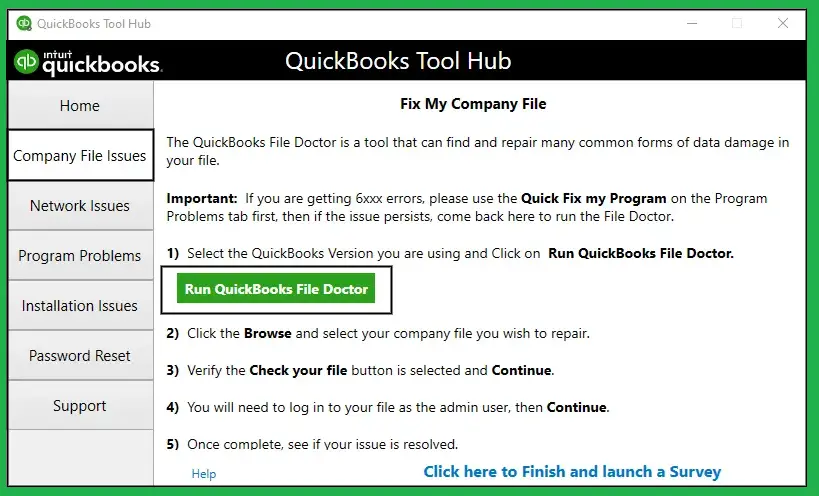
- Open QuickBooks Tool Hub. If the file is hosted, run it on the server.
- Select the Company File Issues tab.
- Click Run QuickBooks File Doctor.
- Choose your company file from the list, or browse to it.
- Pick the option that checks file damage and network connectivity, then enter your admin password if asked.
- Let the scan finish. Big files take a while. Restart the computer and reopen QuickBooks.
Move the Backup to a Local Drive
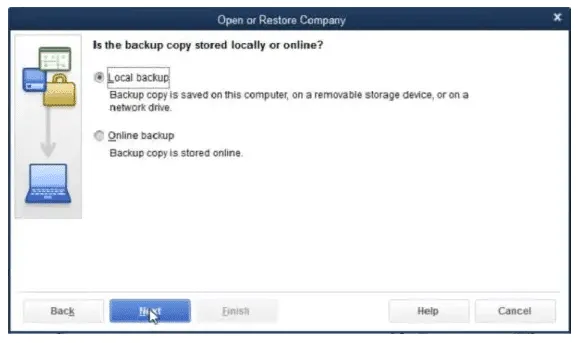
If the error only appears during a restore, begin here instead.
- Copy the .QBB backup to a folder on the computer’s own drive, such as C:\QBBackups.
- Go to File, then Utilities. If you see Stop Hosting Multi-User Access, select it and click Yes when QuickBooks asks to close the company file.
- Shorten the file name and folder path so both stay under 210 characters, and skip special characters.
- Restore from the local copy.
Turn hosting back on afterward, and only on the server.
Rename the .ND and .TLG Files
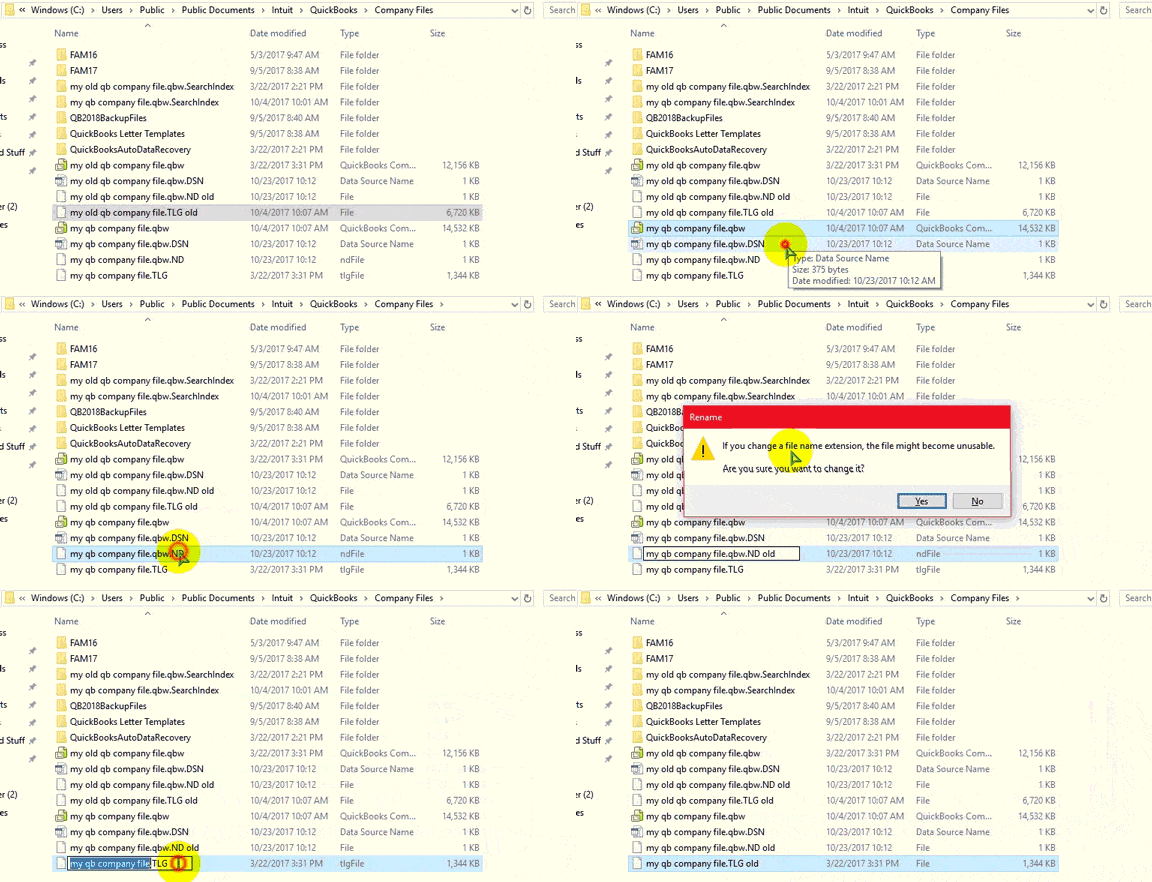
These two files help QuickBooks work across a network. When either one is damaged, QuickBooks can refuse the whole company file. Renaming is safe, since QuickBooks creates fresh copies when it opens the file.
- Open the folder that holds your company file.
- Find company_file.qbw.nd and company_file.qbw.tlg. They share your file’s name.
- Right-click each one, choose Rename, and add .old to the end.
- Reopen QuickBooks and sign in.
Check What Your Antivirus Is Blocking
Security software sometimes treats QuickBooks’ file access as suspicious. Hold Ctrl while you launch QuickBooks so it opens without a company file, and read the file location in the No Company Open window. Then add that folder to your antivirus exclusion list. In Trend Micro, look under scan settings and exceptions. Check that Windows Firewall isn’t blocking QuickBooks either.
Read More:- Fix Windows Firewall isn’t blocking QuickBooks
Pull the File From Auto Data Recovery
When the original is beyond saving, QuickBooks may have a recent copy waiting.
- Open the QuickBooks Auto Data Recovery folder inside the folder that holds your company file.
- Copy the .QBW.adr and .TLG.adr files into a new folder on your desktop.
- Delete .adr from the end of each name.
- Open the renamed .QBW file and check your most recent transactions, since recovery copies can lag behind.
Verify, Then Rebuild
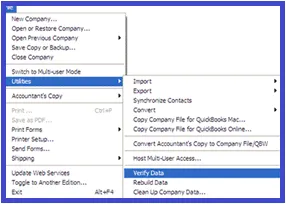
Use this once you can open the file, or on the recovered copy from the last step.
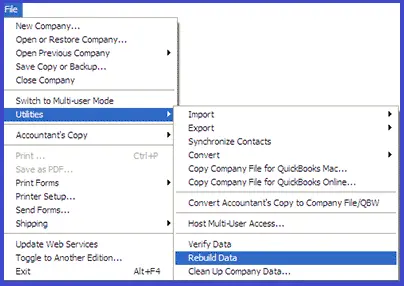
- Go to File, Utilities, then Verify Data.
- If QuickBooks finds problems, return to Utilities and choose Rebuild Data.
- Accept the backup prompt and let the rebuild run. Don’t interrupt it, even if the window says Not Responding.
Kill the Stuck QuickBooks Processes
A leftover background process can keep a file locked.
- Log in to the server as an administrator.
- Press Ctrl + Shift + Esc and open the Users tab.
- End QBW32.exe, qbupdate.exe and QBDBMgr.exe.
- Reopen the company file in multi-user mode.
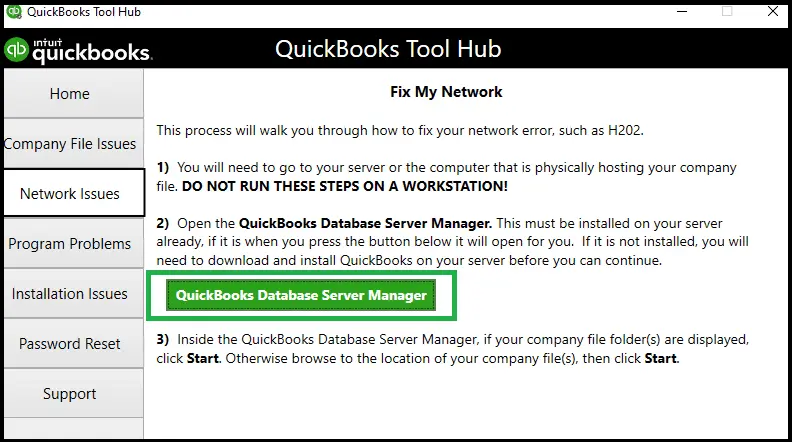
Still nothing? Open QuickBooks Database Server Manager, add the folder with your file, and run a scan. Restarting the computer afterward is worth doing too.
Keeping Error 6147 0 From Coming Back
- Restore backups from a local drive, never straight from a network or USB location
- Use short, plain file names without special characters
- Give authorized users full read and write access to the company file folder
- Install QuickBooks Desktop updates as they’re released
- Close QuickBooks properly rather than shutting the computer down on top of it
- Schedule backups, and test a restore once in a while so you know the files actually work
Still Locked Out of Your File?
If File Doctor and a clean local restore haven’t worked, stop experimenting on the original. Each failed attempt is a risk to the only copy you have. The team at Accounting Assist Pro deals with QuickBooks company file error 6147 0 and its 6000 series relatives regularly. Send us the exact error text and where the file lives, and we’ll pick it up from there.
Back Into the Books
Most cases of this error come down to a file location, a file name or a damaged helper file, and those are fixable without heroics. Start with File Doctor, try the local restore, and only move to rebuilds and recovery copies if you need them.
Then put the prevention habits in place. Local backups, short names and regular updates take almost no effort, and they keep the QuickBooks error 6147 0 from turning into a lost afternoon of month-end work.
Frequently Asked Questions
What does QuickBooks Error 6147 0 mean?
It means QuickBooks Desktop couldn’t open or restore a company file or backup. The cause is usually a damaged file, a bad file path or a blocked network location.
Can I lose data because of this error?
The error usually points to a damaged or unreachable file rather than deleted data. Copy the file and your latest backup before repairing anything, and work on the copy.
Why does it appear when I restore from a network drive?
Restoring over a network adds permission and path problems that a local folder avoids. Copy the .QBB file to the computer’s own drive and restore from there.
Does the 210 character limit really matter?
Yes. A backup name or folder path over 210 characters can trigger QuickBooks Error 6147 0 during a restore. Shortening it takes a minute, so check it early.
Will File Doctor fix it every time?
No. It resolves many damage and network problems, but a badly corrupted file may need an Auto Data Recovery copy, a clean backup or a data repair specialist.